How to Register Your Products for CPSC E-Filing
This guide walks you through registering a product for CPSC e-filing in your ShipSavvy portal, from uploading your file to understanding what each status means. New to CPSC registration in general? Start with What Is CPSC Product Registration? first.
Quick background
Since July 8, 2026, the U.S. Consumer Product Safety Commission (CPSC) has required compliance certificate information to be submitted electronically at the time of import, rather than provided only when requested. This applies to products that require a General Certificate of Conformity (GCC) or a Children's Product Certificate (CPC), including:
- Toys and children's products
- Furniture
- Consumer electronics
- Products with button cell or coin batteries
- Other household goods regulated by the CPSC
Previously, ShipSavvy customers handled this through the Reference Tab and Disclaimer Tab in the Product Catalogue. As of September 15, 2026, that's been replaced with a simpler, dedicated flow, the one described below, so registering a product takes fewer steps and gives you clearer visibility into where each submission stands.
| This feature is only available on accounts where CPSC registration has been enabled. If you don't see the option described below, or if you're not sure whether your products fall under GCC/CPC requirements, reach out to your ShipSavvy account manager or support team. |
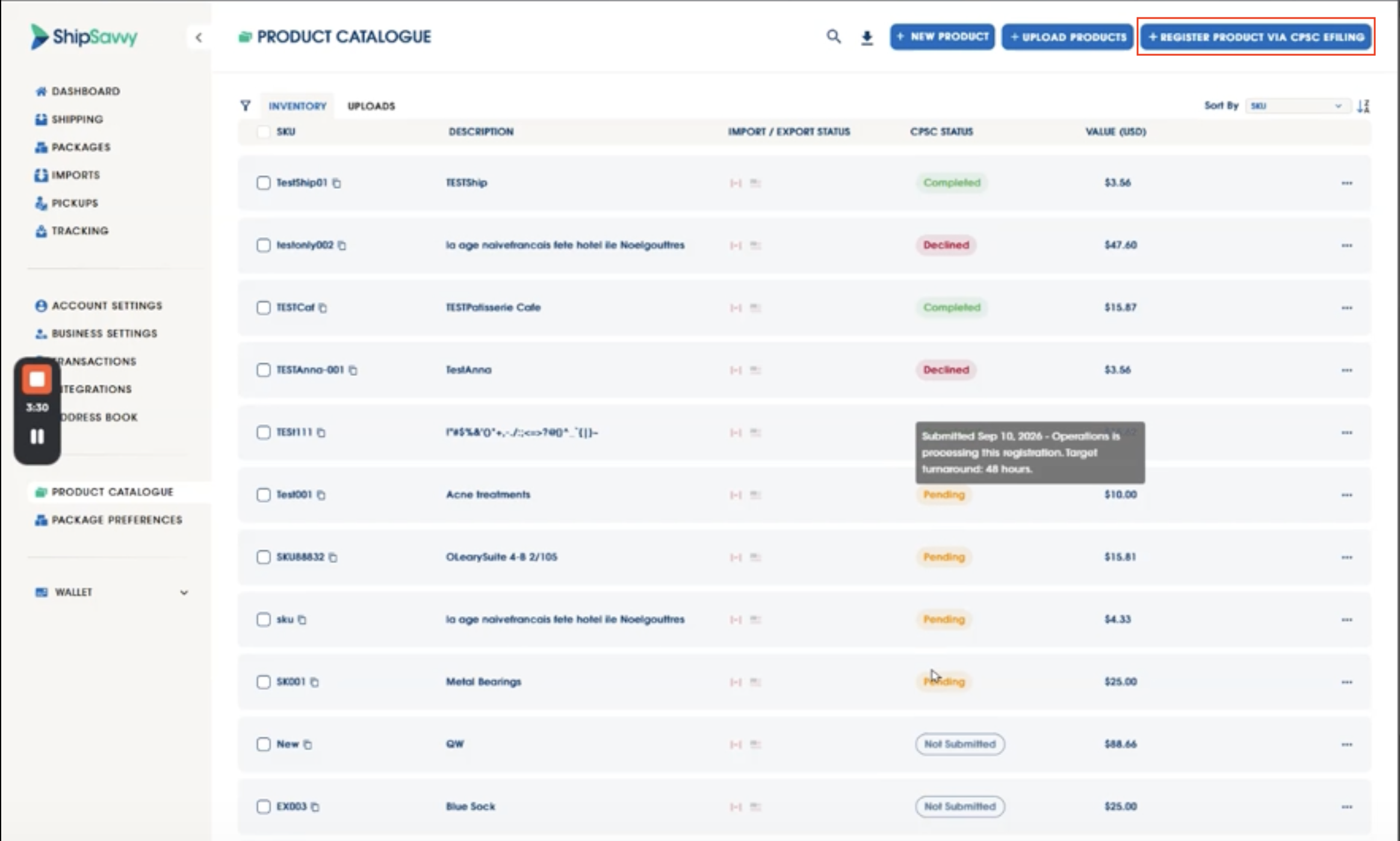
Step 1: Find the Register Product button
In your portal, look for the Register Product via CPSC e-filing button. It works much like the bulk file upload you may already use for other product data.
Step 2: Download the template (and the guide, if you need it)
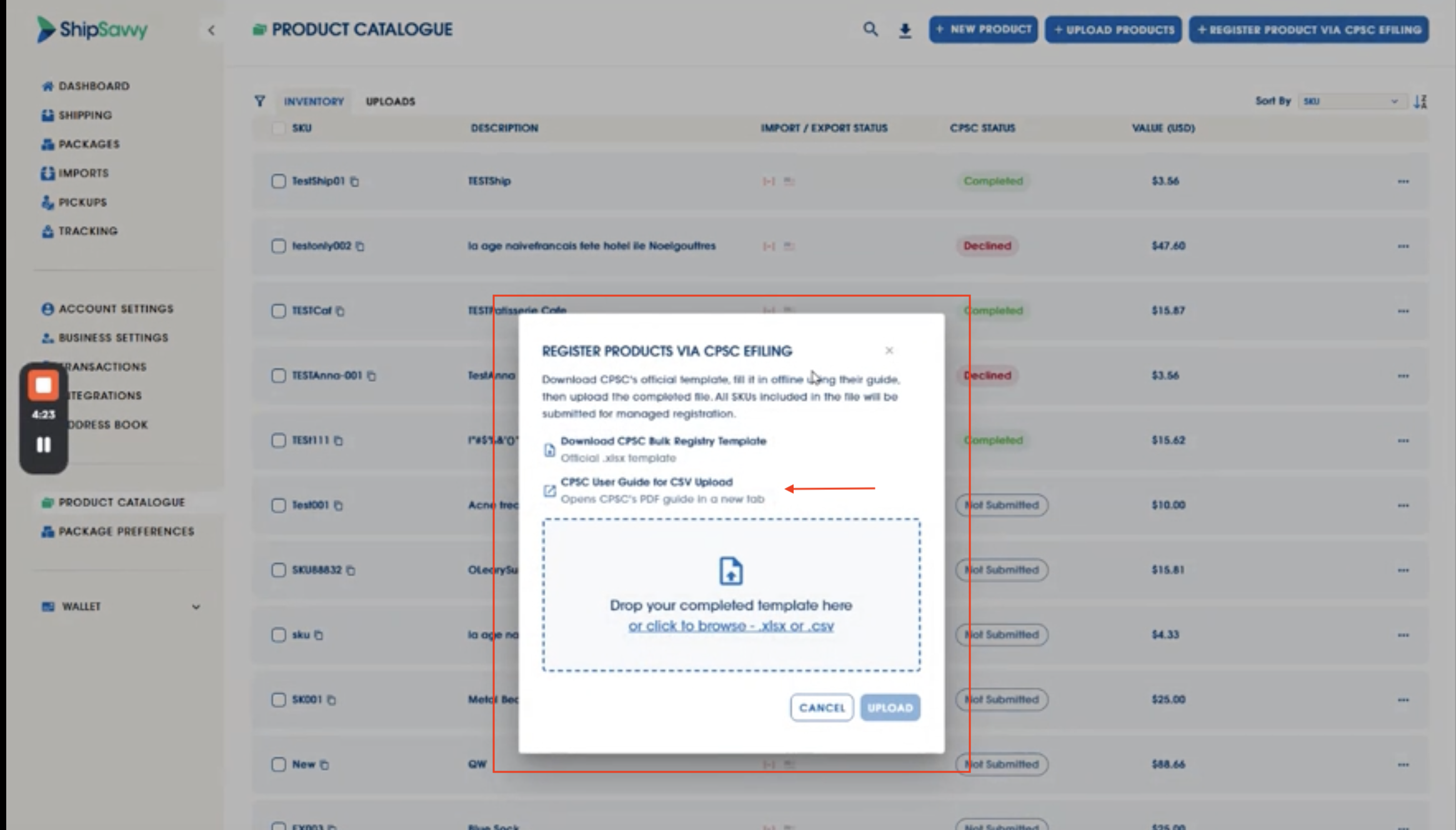
From there, you can download the registration template this is the actual, official template used by the CPSC, not a ShipSavvy version of it. If you'd like help filling it out, there's also a link to the CPSC's own PDF user guide, which walks through each field.
Step 3: Fill out and upload your file
Complete the template with your product details and upload it the same way you would any other bulk file. There's no limit to how many products (SKUs) you can include in one file.
Step 4: Track your status
Once you upload your file, you'll see a confirmation that it's been received. Each product in your submission will then show a CPSC status:
- Pending - Your submission is being reviewed and processed.
- Completed - Registration is confirmed, and the CPSC information now appears automatically on your product's details.
- Declined - There was an issue with that item's submission. You'll receive details by email so you know what to fix.
If you submit multiple products at once, it's normal for different products in the same batch to end up with different statuses for example, some completed while others still need attention.
Step 5: Watch your inbox
You'll automatically receive an email notification when:
- Your submission has been received
- A product's registration has been declined
- A product's registration has been successfully completed
You don't need to keep checking back, we'll let you know as things move.
FAQ
What's the difference between a GCC and a CPC?
A General Certificate of Conformity (GCC) applies to general consumer products regulated by the CPSC. A Children's Product Certificate (CPC) applies specifically to products intended for children. Which one you need depends on the product, your CPSC user guide or account manager can help confirm.
I previously submitted compliance info through the Reference or Disclaimer tab, do I need to do anything?
Reach out to your account manager to confirm whether your existing submissions carry over or need to be re-registered through this new flow.
What happens if a product isn't registered?
Products that require a compliance certificate but haven't been registered may be subject to additional review or delays when clearing customs. Registering ahead of time helps your shipments move smoothly.
What if my product's registration is declined?
You'll receive an email with details on the specific item. If you have questions about what to correct, reach out to your ShipSavvy account manager or support team, and we're happy to help you get it resubmitted.
Is there a limit to how many products I can register at once?
No - you can include as many SKUs as you need in a single upload.
Where will the CPSC information show up once approved?
Once a registration is completed, the CPSC details are added automatically to that product's information in your portal, there's nothing further you need to enter.
Still have questions? Just reach out to your ShipSavvy account manager or send an email to customerservice@shipsavvy.com, we're glad to help.
Was this article helpful?
That’s Great!
Thank you for your feedback
Sorry! We couldn't be helpful
Thank you for your feedback
Feedback sent
We appreciate your effort and will try to fix the article